
Migrating mailboxes from Google Workspace to Microsoft 365 (formerly Office 365) offers several benefits
Organizations worldwide are making the switch from Google Workspace to Microsoft 365, and it’s easy to see why. With a unified ecosystem that seamlessly integrates with Windows, advanced security features to protect your data, enhanced collaboration tools to boost teamwork, and unparalleled scalability to grow with your business, Microsoft 365 is the ultimate solution for modern enterprises.
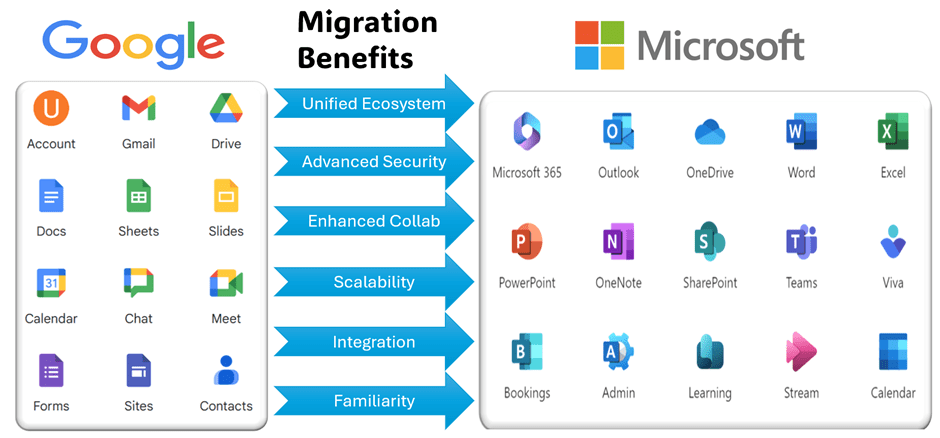
Unified Ecosystem
Microsoft 365 provides a cohesive suite of tools, including Exchange Online for email, SharePoint for collaboration, and Teams for communication. By migrating, you consolidate your services within a single ecosystem, streamlining administration and user experience.
Advanced Security
Microsoft 365 is designed to grow with your business. It offers centralized administration and security features that make it easier to manage a growing workforce Microsoft 365 offers robust security features such as multi-factor authentication (MFA), data loss prevention (DLP), and encryption. These enhance protection against threats like phishing, malware, and unauthorized access.
Enhanced Collaboration
With Microsoft 365, users can seamlessly collaborate on documents using OneDrive and SharePoint. Teams integration allows real-time communication, file sharing, and video conferencing.
Scalability
Microsoft 365 scales easily to accommodate growing organizations. You can add or remove licenses as needed, ensuring flexibility and cost-effectiveness
Integration with Windows
If your organization uses Windows PCs, Microsoft 365 integrates seamlessly with Windows 10 and other Microsoft products. Microsoft 365 includes a wide range of desktop applications like Word, Excel, and PowerPoint, which are more robust and feature-rich compared to their Google Workspace counterparts
Below is a key feature comparison between Google Workspace and Microsoft 365
| Feature/Aspect | Microsoft 365 | Google Workspace |
| Desktop Applications | Offers full-featured desktop apps (Word, Excel, etc.) | Primarily web-based apps with limited offline capabilities |
| Email Service | Outlook with advanced features and integration, yet simple and easy to use. | Gmail, known for simplicity and ease of use |
| Storage | OneDrive with 1TB per user | Google Drive with 30GB per user (basic plan) |
| Collaboration Tools | Microsoft Teams for chat, video calls, and collaboration | Google Meet and Chat for communication |
| Security Features | Advanced security and compliance tools | Strong security but less advanced compliance options |
| Integration with Other Tools | Seamless integration with other Microsoft products (e.g., Azure, Dynamics) | Integrates well with other Google services mainly (e.g., Google Analytics, Ads) |
| Customization and Flexibility | Highly customizable with various enterprise options | More straightforward but less customizable |
| User Interface | More traditional and feature-rich | Mainly simple with less rich reatures |
| Support and Training | Extensive support and training resources available | Good support but less extensive training options |
| Pricing | Almost same price as google but with advanced features | Almost same price as Microsoft 365 but not advanced features in comparinsion with Microsoft 365 |
| Document Formatting | Extensive formatting options in Word | Basic formatting options in Google Docs |
| Email Filtering | Advanced email filtering and categorization | Basic email filtering and categorization |
| File Sharing | OneDrive with advanced sharing options | Google Drive with easy sharing but fewer options |
| Mobile Apps | Robust mobile apps for all Office apps | Strong mobile apps, but less feature-rich than Microsoft |
| Compliance | Comprehensive compliance solutions (GDPR, HIPAA, etc.) | Basic compliance features, less comprehensive |
| Market Share | Higher market share in enterprise environments. | Adoptation mainly among small to medium-sized businesses |
Selecting the appropriate subscription and license is essential to ensure your organization gets the features it needs. Microsoft offers tailored plans for businesses of all sizes, from small enterprises to large corporations, as well as non-profits and government entities. For detailed offerings for small businesses, please refer Small business plan comparison. For enterprise resources, visit this Enterprise plan comparison.
This blog series aims to provide a straightforward guide on migrating from Google Suite to Microsoft 365, without diving into the complexities of licensing or specific features. Stay tuned for my upcoming posts where I’ll explore various migration strategies, demonstrate a complete end-to-end migration, and discuss potential limitations. Exciting times ahead!
 Bite sized Microsoft 365
Leave a reply to Before we begin the Google workspace migration – Bite sized Microsoft 365 Cancel reply