
The exciting thing about AI is not the technology itself, but what we can do with it when we apply it to real-world problems and help people – Satya Nadella, Microsoft Chairman and CEO, expressed this sentiment during a session at the world economic forum annual meeting.
Deep down, everyone wants to dream, create, and have an impact. Whether it’s writing a book, making a breakthrough, or assisting others, we yearn for meaningful work. Unfortunately, everyday chores can sap our time and creativity. To truly engage with our work, we need a novel approach, not just improving what we do, but discovering a whole new way to how we do it!
Microsoft 365 is a cutting-edge AI tool designed to enhance productivity at work. By leveraging large language models (LLMs) and integrating with Microsoft Graph and Microsoft 365 apps, Copilot transforms your words into a potent productivity resources.
I’ve been immersing myself in exploring Copilot recently and it’s been quite the captivating journey. The deeper I delve, the more I’m compelled to uncover new facets and wonders of this tool.
For the roadmap please refer https://www.microsoft.com/en-in/microsoft-365/roadmap?filters=&searchterms=copilot
At the time of writing this blog the roadmap shows 85 updates that are currently being developed or tested.

Here is the timeline of Copilot since its announcement back in March 2023.
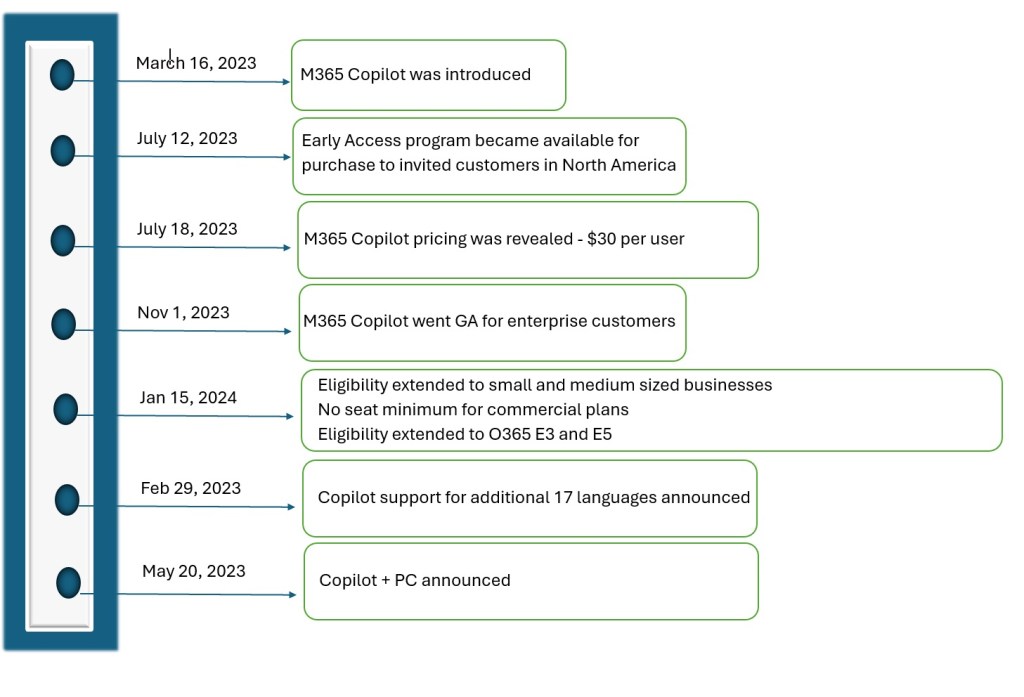
How Copilot transforms work
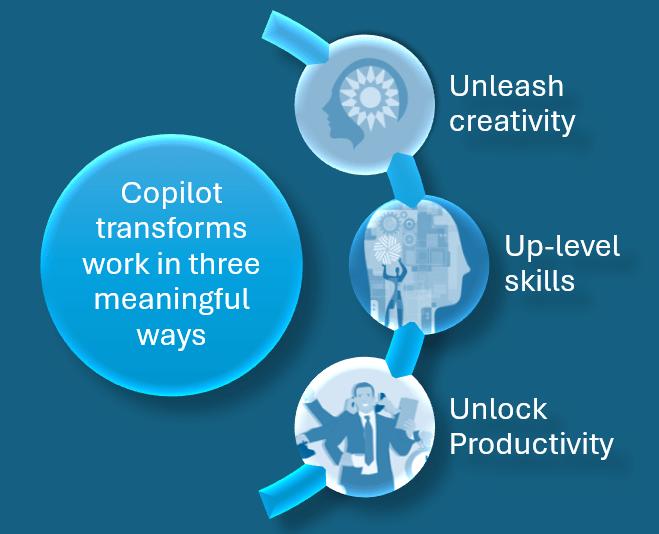
Copilot for Microsoft 365 transforms work in three ways:
Unleash Creativity
Copilot can significantly enhance creativity and productivity. Let’s explore how it achieves this:
Jump-Starting Creativity: Copilot eliminates the daunting blank slate by providing a starting point. Whether you’re writing an article, a code snippet, or a presentation, Copilot generates an initial draft based on your prompt. This jump-starts your creative process and gets ideas flowing.
Time Savings: Copilot accelerates content creation. Instead of spending hours researching, writing, and editing, you can leverage Copilot’s suggestions. It provides relevant content, saving you valuable time. Even if the solution isn’t perfect, it puts you ahead by providing a foundation to build upon.
Iterative Editing: Copilot’s drafts are malleable. As the author, you can edit, refine, and iterate. Copilot doesn’t replace your creativity; it complements it. You can prompt it to rewrite, shorten, or adjust the content until it aligns perfectly with your vision.
Content Recycling: In PowerPoint, Copilot seamlessly integrates with your existing documents. Need to create a presentation? Simply provide a prompt, and Copilot pulls relevant content from your previous work. It’s like having an AI assistant that remembers your past ideas.
Remember, Copilot isn’t just about accuracy; it’s about sparking creativity and streamlining your workflow.
Up-Level Skills
Copilot is a transformative tool that enhances skills and accelerates learning
Skill Enhancement: Copilot amplifies your existing abilities. It helps you excel in areas where you’re already proficient and provides support for tasks you’re still mastering. Whether you’re a seasoned professional or a beginner, Copilot adapts to your skill level.
Unlocking Functionality: Most people use only a fraction of the available features in Microsoft 365. Copilot changes this by allowing you to access rich functionality through natural language prompts. No need to memorize complex commands; just express what you want, and Copilot delivers.
AI Collaboration: Copilot bridges the gap between humans and AI. It revolutionizes how we interact with artificial intelligence. As you collaborate with Copilot, it becomes an indispensable partner, assisting you in diverse tasks.
Edge for Early Adopters: Embracing Copilot gives you an advantage. While there’s a learning curve, those who adopt this new way of working will quickly outpace others. Copilot becomes your secret weapon for productivity and creativity.
Copilot empowers users to level up their skills, simplifies complex tasks, and propels them ahead in the ever-evolving landscape of work
Unlock productivity
While we all strive to focus on the 20% of our work that truly matters, the reality is that 80% of our time gets consumed by busywork that weighs us down. Copilot lightens this burden
Writing Assistance and Content Generation: Copilot can assist in writing and content generation. For example, it helps draft emails, create reports, and generate code snippets. By automating routine tasks, Copilot frees up your time for more critical work.
Information Search and Summarization: Copilot is not only capable of generating content but also efficiently searching for and summarizing information. It can quickly find relevant details, saving you time and effort.
Real-Time Meeting Insights: During Teams meetings, Copilot listens, identifies key discussion points, and summarizes them. It also suggests action items. Example: In a brainstorming session, Copilot highlights consensus points and areas of disagreement, helping you make informed decisions.
Example: When composing an email, Copilot suggests relevant phrases and helps you draft concise and effective messages.
Example: If you need to summarize a lengthy document, Copilot can extract key points and provide a concise summary.
Copilot Elevates Productivity
Security and Compliance: A Top Priority
Microsoft Copilot collaborates with Microsoft Graph to uphold user permissions, data security, and compliance. All responses are generated based on information accessible to the user. Copilot for Microsoft 365 adheres to privacy, security, and compliance standards, including GDPR and EU Data Boundary regulations. Additionally, Copilot operates with robust safeguards, such as blocking harmful content and preventing prompt injections.
License requirements
Copilot for Microsoft 365 is available as an add-on plan with one of the following licensing prerequisites:
For Business and Enterprise:
- Microsoft 365 plans:
- Microsoft 365 E5
- Microsoft 365 E3
- Microsoft 365 F1
- Microsoft 365 F3
- Microsoft 365 Business Basic
- Microsoft 365 Business Premium
- Microsoft 365 Business Standard
- Microsoft 365 Apps for business
- Microsoft 365 Apps for enterprise
- Office 365 plans:
- Office 365 E5
- Office 365 E3
- Office 365 E1
- Office 365 F3
- Microsoft Teams plans:
- Microsoft Teams Essentials
- Microsoft Teams Enterprise
- Microsoft Teams EEA (European Economic Area)
- Exchange plans:
- Exchange Kiosk
- Exchange Plan 1
- Exchange Plan 2
- SharePoint plans:
- SharePoint Plan 1
- SharePoint Plan 2
- OneDrive for Business plans:
- OneDrive for Business Plan 1
- OneDrive for Business Plan 2
- Planner and Project plans:
- Microsoft Planner Plan 1 (formerly Project Plan 1)
- Microsoft Project Plan 3
- Microsoft Project Plan 5
- Project Online Essentials
- Visio plans:
- Visio Plan 1
- Visio Plan 2
- Other plans:
- Microsoft ClipChamp
- For Education Faculty and Higher Education Students Aged 18+:
- Microsoft 365 A1*
- Microsoft 365 A3*
- Microsoft 365 A5*
- Office 365 A1*
- Office 365 A3*
- Office 365 A5*
*Available via Enrollment for Education Solutions (EES) or Cloud Solution Provider (CSP) only.
For more information on licensing requirements please visit Microsoft Copilot for Microsoft 365 overview | Microsoft Learn
Get ready to embark on an exhilarating journey! In our upcoming blogs, we’ll delve deep into the intricate components of Copilot, unravelling its inner workings and revealing
 Bite sized Microsoft 365
Leave a reply to Copilot Components and architecture – Bite sized Microsoft 365 Cancel reply